Hood Warfare 2 loadouts combine a primary weapon, secondary weapon, lethal equipment, and a passive ability. Our captured loadout menu shows CHOPPA (AR), GLOCK (PISTOL), GRENADE, and +HP together in Custom Loadout 1. The official Steam description also confirms customizable weapon attachments and several separate unlock paths.
Which Hood Warfare 2 weapons are visible in the menu?
The screenshot below provides a concrete loadout example. Its labels identify the items and their slots; it does not show damage, unlock requirements, or which attachments are fitted.
| Slot shown in Custom Loadout 1 | Item shown | Category shown |
|---|---|---|
| Primary weapon | CHOPPA | AR |
| Secondary weapon | GLOCK | PISTOL |
| Lethal | GRENADE | Lethal equipment |
| Passive ability | +HP | Passive ability |
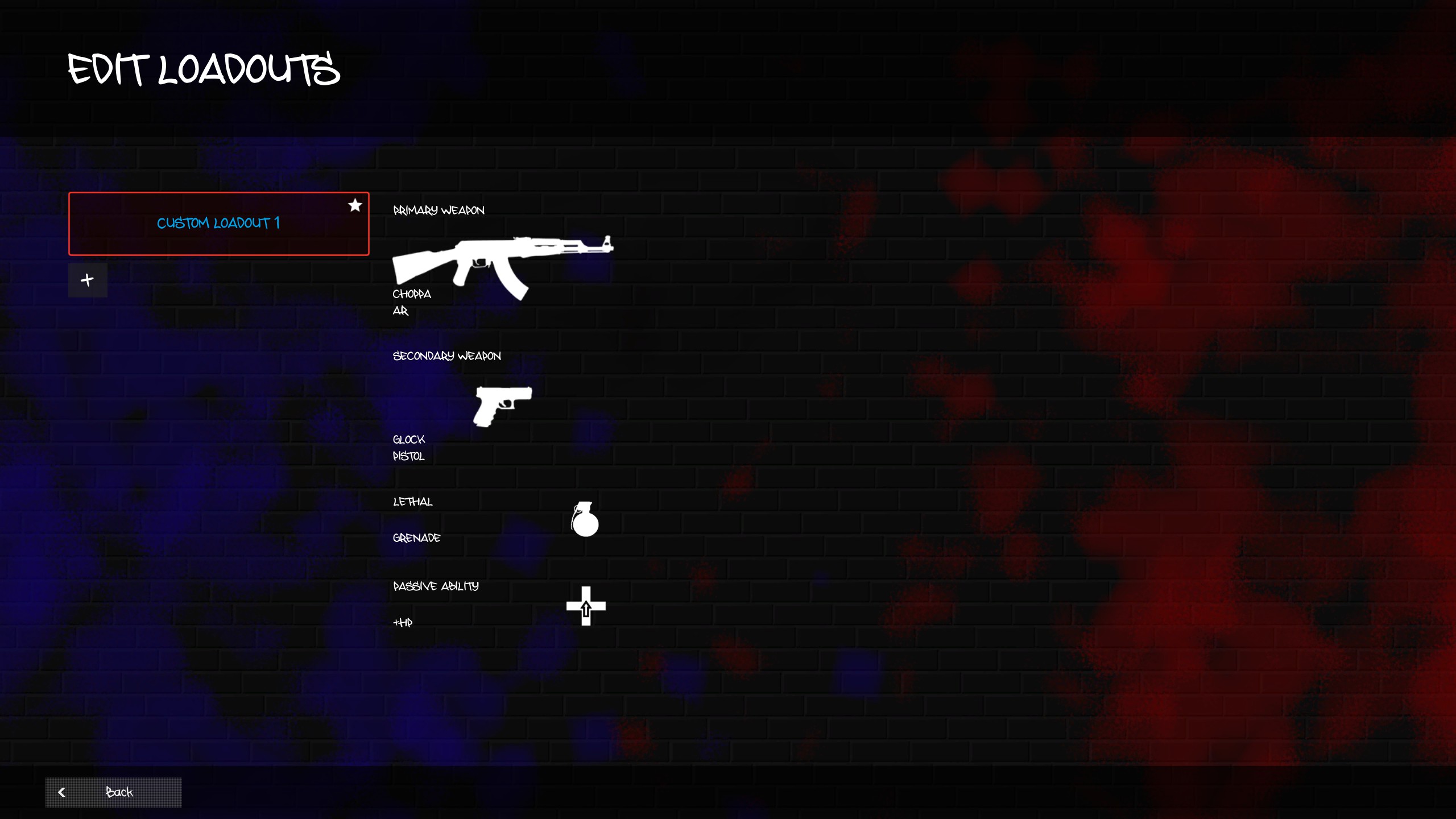
This is the setup visible on the captured account. Use the weapon and ability selections in your own menu to see which alternatives are currently available to you.
What other gun names do community guides report?
Torin Hall’s Tpose Gaming guide, updated October 15, 2026, reports the following names. These are community-reported terms, including informal descriptions, rather than an official complete roster.
| Group in that guide | Names reported |
|---|---|
| Primary weapons | Chopper, AKM, Uzi, Mac 10, “pump shotty” (pump shotgun), 308 sniper, Old Head DMR |
| Secondary weapons | Glock, The Nine, Blade (melee) |
Our menu screenshot independently confirms CHOPPA and GLOCK. The community guide uses Chopper; we retain the screenshot’s spelling for the observed item and do not count the spelling difference as another weapon. The remaining entries above still need individual menu verification. This list provides names to look for, without assigning damage values, unlock levels, or tier positions to them.
What can you customize in a Hood Warfare 2 loadout?
The developer’s Steam description names sights, magazines, grips, suppressors, and other attachments, plus perks and equipment selected before a match. Open the specific weapon’s attachment screen to check its compatible options and challenge requirements.
| Part of a loadout | What the developer confirms | What to check in your game |
|---|---|---|
| Weapon | More weapons become available as reputation levels rise. | The selected weapon’s unlock requirement in the current build. |
| Attachments | Sights, magazines, grips, suppressors, and other options are mentioned. Weapon challenges unlock attachments. | Which challenge belongs to the gun you selected and which options are actually compatible. |
| Perks and equipment | Both can be set before a match. | The current menu’s choices and any unlock requirement. |
| Skins | Kills with a gun unlock skins for that gun. | The specific skin’s progress and whether a given match advances it. |
For a step-by-step breakdown of the three unlock paths, use the progression guide.
How should you choose what to unlock next?
Start with the reward you want. If it is a new weapon or equipment item, the published path is to play matches and level up reputation. If it is an attachment, open that weapon’s challenge in the current game and work toward its stated requirement. If it is a skin, the store says kills with the corresponding gun are the route. This prevents a common mix-up: an attachment challenge and a reputation level are different systems.
Before saving a preset, check the exact gun and the attachment slot shown in your own build. The developer’s 1.0.10 notes say an issue with loadout presets not saving was fixed in that patch. The announcement describes a fix; it does not guarantee that a later build or every account behaves identically. If a change does not stick, record your game version and check the preset after returning to the menu.
How do you choose a loadout before comparing the best weapons?
Use the captured CHOPPA / GLOCK / GRENADE / +HP combination as a menu reference when locating the four loadout slots. Then select a weapon available on your account, read its current attachment challenges, and save the setup. If you want to learn the controls or check a new configuration, the developer confirms that you can create a match with bots; the beginner guide explains the match options.
For a useful comparison, keep the map and mode consistent and change one item at a time. That makes it easier to decide whether a weapon, attachment, or passive suits the way you play. A named community loadout can provide something to investigate, but its recommendation alone does not establish the strongest setup.
What is still unconfirmed about the best Hood Warfare 2 loadout?
We have not yet completed comparative match testing. The menu observation above establishes item names and slots; the community list supplies additional reported names. Neither provides measured damage, recoil, attachment effects, or results across modes and maps, so this page does not rank the best guns.
The Steam listing also does not specify a complete roster or say that every gun accepts every attachment. Versioned weapon comparisons and map-specific recommendations will need repeatable observations of the actual setups. For now, the confirmed names, attributed community list, and official unlock rules are the parts of this guide you can check against your own menus.