The short version: how do you start?
- Check the PC version before buying. Hood Warfare 2 is sold on Steam for Windows. Compare your PC with the published requirements and check the live store for your regional price. Steam also lists kernel-level Easy Anti-Cheat.
- Choose how to play. The developer says you can play online with friends or other players, or set up a match against bots. For a bot match, the store description says you can choose a map, mode, and match settings and add bots to fill the teams. It does not describe every menu button or promise that bot matches work offline.
- Pick a mode by its win condition. Kills decide GangBang and Chaos. The other four modes score territory, a bag objective, bomb rounds, or collected chains. Use the six-mode comparison below before joining.
- Review your loadout. The developer says you can set weapons, attachments, perks, and equipment before a match. Playing matches raises reputation to unlock weapons and equipment; weapon challenges unlock attachments; kills with a gun unlock skins. See the progression guide for the three paths.
- Check the current version when playing with friends. Patch 1.0.1.4 introduced password-protected private lobbies. Its announcement tells players to look for the version at the bottom-right of the game menu and fully restart Steam if the update has not appeared.
Set up a first bot match
The Create Game menu provides separate Mode and Map selectors. In our captured example, Mode is Turf War, Map is Downtown, Enable Bots is Enabled, and AI Difficulty is Regular. Team Size is 5v5 and Points to Win is 350. Check those fields before starting: they describe this selected setup, not a fixed rule for all matches.
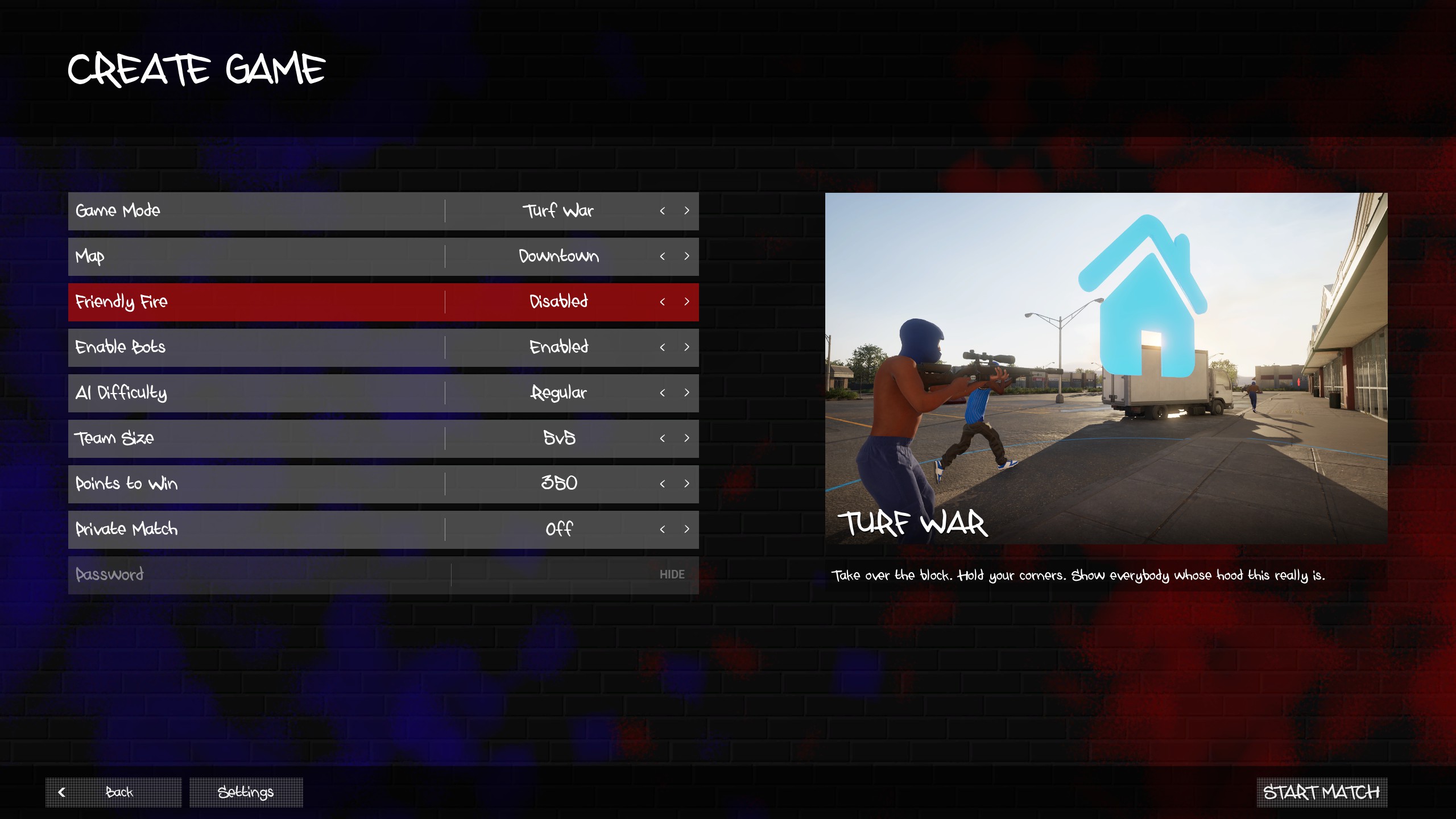
For an explanation of the in-match objective indicators and score, open the Downtown screenshot guide. The weapon reference shows a separate menu example with CHOPPA, GLOCK, GRENADE, and +HP in the four loadout slots.
Which mode should you choose first?
Choose the kind of objective you want rather than relying on a generic “best beginner mode” ranking. Trapstar Games describes six modes on the Steam store:
| If you want… | Choose | What the developer says wins |
|---|---|---|
| A two-team kill race | GangBang | Your gang gets the most kills. |
| A free-for-all kill race | Chaos | You get the most kills as an individual. |
| A territory objective | Turf War | Your gang earns points for the turf it holds. |
| An attack-and-defense bag objective | Hit A Lick | Take the enemy bag to your hood while protecting your own. |
| One-life bomb rounds | Destroy The Block | Your gang plants or defuses the bomb to win a round. |
| Points from pickups after eliminations | Chain Snatch | Collect enemy chains; collect teammates’ chains before the other gang does. |
For example, a high kill count alone does not describe the scoring goal in Turf War or Chain Snatch. The mode guide explains each published objective in more detail. The store does not provide score limits, timers, team sizes, or a complete map-by-mode list; check the match settings shown in your game.
What should you know about maps?
The official description names Downtown, the Suburbs, The Trenches, and Chicago Mall as places to fight, with routes and positions to learn. These are named settings, not a confirmed total map count: the developer’s 1.0.10 patch notes also mention a small Supermarket map.
A bot match is an available way to look at the current map selection without depending on a particular public lobby. The map index traces the published names to their sources; the Downtown guide adds our own menu and street screenshots. Full route diagrams, spawn comparisons, and shortcut recommendations still need further checks.
How do weapons and attachments work?
The store listing says you can change sights, magazines, grips, suppressors, and other attachments, and set perks and equipment before a match. It gives three different unlock routes:
| Goal | Published route |
|---|---|
| More weapons or equipment | Play matches and level up reputation. |
| Attachments for a weapon | Complete that weapon’s challenges. |
| Skins for a gun | Get kills with that gun. |
Our captured loadout menu shows CHOPPA, GLOCK, GRENADE, and +HP together. The weapon and loadout reference explains those slots and separates menu evidence from a community-reported gun list. Use your own weapon and challenge screens for current unlock requirements; the progression guide explains how the three unlock routes differ.
Playing with friends, voice chat, and common setup checks
Online play with friends is described on Steam. The developer’s 1.0.1.4 announcement adds private lobbies protected by a password. It does not document exact invite buttons, player limits, or whether private matches award progression. Read the private-match guide before organizing a group.
The 1.0.10 announcement says voice chat can address the lobby or just your team. It lists T as the default push-to-talk key and an open-mic option in settings. That is an announced default; check your current bindings and audio settings. Patch 1.0.1.4 also tells players with missing sound to select an audio output device in game settings. If an update does not appear, the developer recommends fully exiting Steam through Steam → Exit Steam and reopening it.
What still needs a play test?
Our menu screenshots document visible settings and equipment. Complete control-layout checks, bot-match progression, offline support, weapon performance, and map tactics still need full-session testing. We distinguish these menu observations from official game descriptions and attributed community reports; another site’s loadout advice is not our own match result.